Wikipedia & MediaWiki revision-history MCP server
refract mcp starts a stdio Model Context Protocol server that lets AI agents analyze page revision histories from Wikipedia or any MediaWiki API.
The MCP server supports sampling — it can request the host's LLM to interpret events at any BYO-inference boundary without managing API keys.
Quick start
refract mcp
The server starts and waits for MCP client connections on stdio (wikihistory mcp also works). Connect any MCP-compatible client.
Connecting AI coding agents
The server is the mcp command of the @refract-org/cli package, so that is the
package a client configuration names. @refract-org/mcp is a library with no
executable, and the unscoped npm package refract is an unrelated project —
npx refract mcp runs someone else's code.
Claude Code
{
  "mcpServers": {
    "refract": {
      "command": "npx",
      "args": ["-y", "@refract-org/cli", "mcp"]
    }
  }
}
Then prompt Claude Code:
"Analyze the Wikipedia page for Bitcoin and tell me when the most controversial edits happened."
Claude Code calls Refract's MCP tools to fetch the analysis, reads the structured events, and summarizes the findings.
VS Code / Cursor / GitHub Copilot
{
  "mcpServers": {
    "refract": {
      "command": "npx",
      "args": ["-y", "@refract-org/cli", "mcp"]
    }
  }
}
Claude Desktop
{
  "mcpServers": {
    "refract": {
      "command": "npx",
      "args": ["-y", "@refract-org/cli", "mcp"]
    }
  }
}
Tutorial: Ask an AI agent about claim history
Start the MCP server in one terminal:
refract mcpConnect your AI agent using one of the configs above.
Ask the agent:
"Use Refract to analyze the Wikipedia page for ChatGPT. Show me a timeline of when citations were added and removed. Which citations have survived the longest?"
The agent calls
refract analyzevia MCP, receives structured events, and interprets the citation lifecycle.Track a specific claim:
"Using Refract, check the claim 'GPT-4 was trained on 45TB of text data' on the ChatGPT Wikipedia page. When was it first added? Has it been removed or rewritten?"
The agent calls
refract claimvia MCP, gets the claim's revision history, and reports.Use model-assisted classification:
"Classify the most recent edit to the ChatGPT page — is it a revert, a major addition, or a minor edit?"
The agent calls
refract classify heuristicvia MCP with the edit data.
Available tools
analyze
Analyze a MediaWiki page's full edit history. Returns structured events with schemaVersion, FactProvenance, and deterministic hashes.
| Parameter | Type | Required | Description |
|---|---|---|---|
page |
string | required | Page title |
depth |
enum | brief, detailed, forensic |
|
api |
string | MediaWiki API base URL | |
from |
string | Start revision ID | |
to |
string | End revision ID | |
since |
string | Re-observe from ISO timestamp |
claim
Track a specific sentence across revisions. Shows first seen, modifications, removals, and reintroductions.
| Parameter | Type | Required | Description |
|---|---|---|---|
page |
string | required | Page title |
text |
string | required | Sentence text to track (partial match) |
export
Export page analysis as structured JSON.
| Parameter | Type | Required | Description |
|---|---|---|---|
page |
string | required | Page title |
depth |
enum | brief, detailed, forensic |
|
api |
string | MediaWiki API base URL | |
since |
string | Re-observe from ISO timestamp |
cron
Re-observe pages for scheduled monitoring.
| Parameter | Type | Required | Description |
|---|---|---|---|
pagesFile |
string | required | File path with one page title per line |
classify
Ask a model to classify a single observation boundary. See CLI reference for the boundary table and all options.
| Parameter | Type | Required | Description |
|---|---|---|---|
boundary |
enum | required | revert, sentence_similarity, heuristic, template_signal, activity_spike |
input |
object | required | Input data (fields vary by boundary) |
apiKey |
string | Inference provider API key (env: REFRACT_INFERENCE_API_KEY) |
|
endpoint |
string | OpenAI-compatible endpoint (DeepSeek, Ollama, etc.) | |
model |
string | Model name |
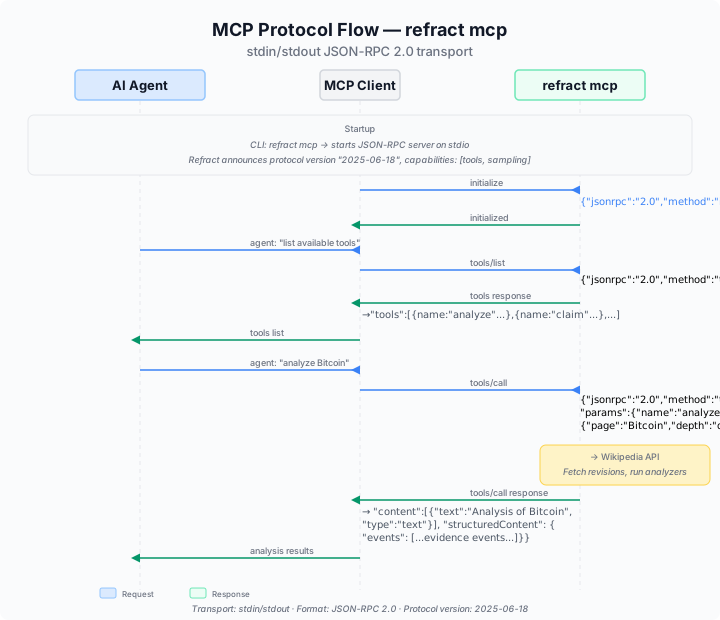
Protocol
- Transport: stdio (stdin for requests, stdout for responses)
- Format: JSON-RPC 2.0 (protocol version
2025-06-18) - Capabilities:
tools,sampling - Initialization: Send
tools/listto discover tools,tools/callto invoke
Validation
To verify your MCP setup is working:
# Start the server
echo '{"jsonrpc":"2.0","id":1,"method":"tools/list"}' | refract mcp | head -1
You should receive a JSON-RPC response listing the available tools. For interactive testing, use the MCP Inspector:
npx @modelcontextprotocol/inspector npx -y @refract-org/cli mcp